Know your hardware.
Inspect installed devices and driver versions. Review Microsoft Catalog candidates and supported manufacturer comparisons.
 DriverOrbit
WINDOWS 11 · DESKTOP APP
Meet DriverOrbit. See what’s installed, compare available versions, and review supported updates before they reach your PC.
Free edition + optional Pro · By Prosper Technologies
YOUR MAINTENANCE WORKSPACE
One desktop interface for device inventory, Microsoft Catalog candidates and supported OEM comparisons. Real versions. Clear sources. Your next step.
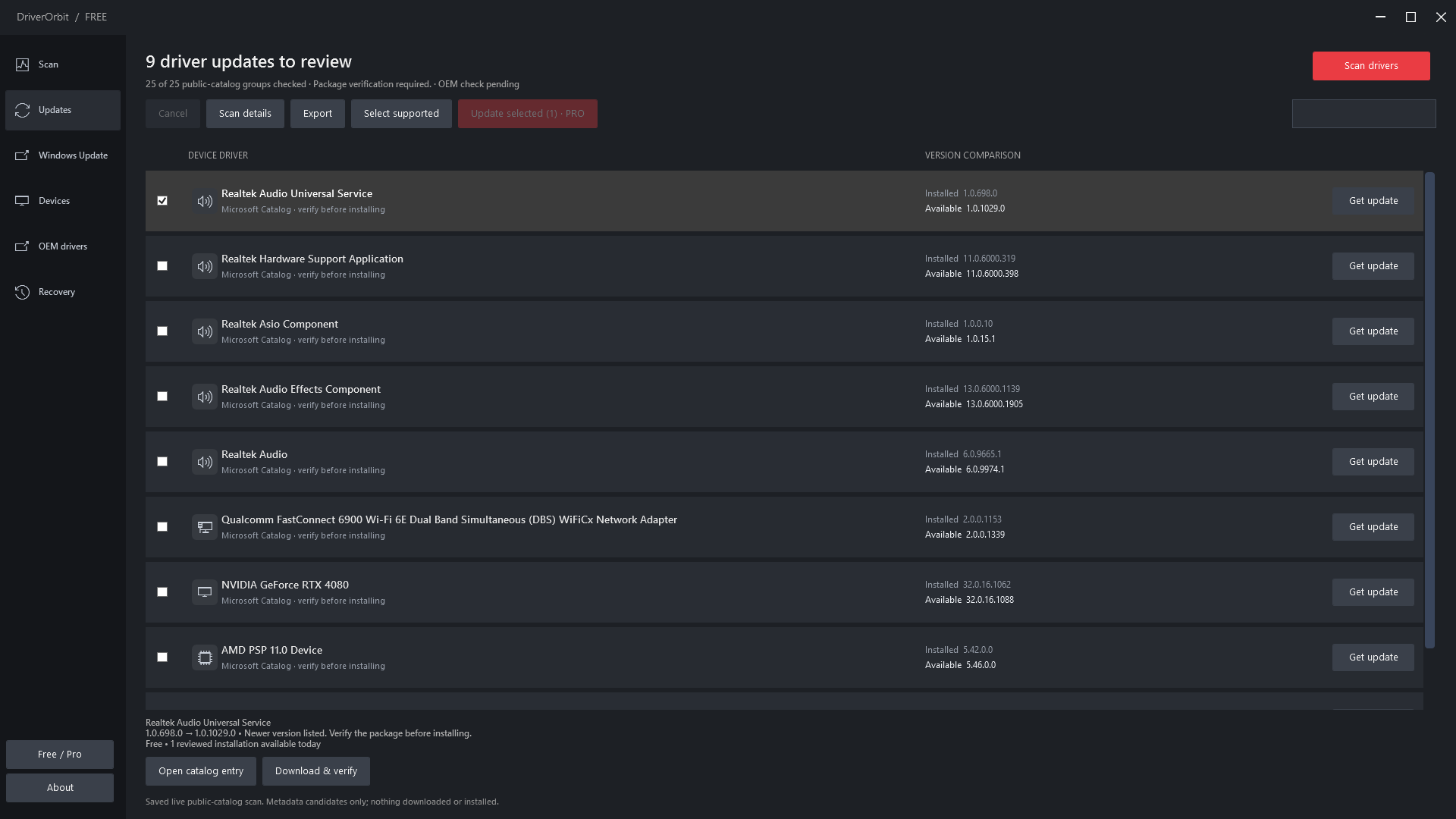
Screenshots show the current interface with saved real scan results. They do not show a completed bulk installation or an activated Pro plan. Available updates vary by PC.
FROM DISCOVERY TO DECISION
Inspect installed devices and driver versions. Review Microsoft Catalog candidates and supported manufacturer comparisons.
Supported installations verify package signatures and compatibility and require a verified backup of the existing driver package.
Approve the prepared update and Windows administrator prompt. Pro batches install sequentially and stop when a restart or further review is needed.
No automatic restart. No automatic rollback. Some vendor packages need the manufacturer’s installer; coverage depends on your hardware and supported sources.
FREE & PRO
Free covers scans and individual reviewed updates. Pro adds bulk updates for supported drivers, with one subscription for one PC.
DRIVERORBIT FREE
For checking your PC and updating one driver at a time.
DRIVERORBIT PRO
OPTIONAL SUBSCRIPTIONFor maintaining multiple supported drivers in one reviewed batch.
Pro checkout is not open yet. When available, recurring billing and cancellation will be handled by Gumroad. Applicable taxes may apply. Recovery history remains accessible after Pro expires. Scheduling is not included.
RELEASE STATUS
The public release is being prepared. DriverOrbit is not yet available through Microsoft Store or Softonic, and public downloads and Pro checkout are not open.
Microsoft Store packaging and final installation testing are still in progress. Follow the project on GitHub for release updates.
A FEW THINGS TO KNOW
No. Coverage depends on the device, hardware identifiers and supported source catalogs. A newer catalog candidate still needs compatibility and package verification before it can be installed. DriverOrbit does not promise a particular number of updates.
Pro prepares a batch of 2–20 supported drivers for final review, then installs them sequentially. It stops for a required restart, failure or uncertain result. It does not automatically restart your PC.
No. When subscriptions open, cancellation will be managed through Gumroad. Removing an activated PC or uninstalling DriverOrbit does not cancel recurring billing.
Inventory, backups and driver history are stored locally. Online driver sources receive the queries needed to find packages. The activation service receives subscription and device-verification information, not your full driver inventory. Read the privacy notice for details.